 Exhibit
For iMessage, WhatsApp, Signal and more, on your MaciMessage, WhatsApp, Signal


Your texts, ready for court.
Exhibit turns a conversation on your Mac into a PDF you can file, with the exact date, time and time zone on every message, edit history, read receipts and Bates numbers.
A screenshot shows the screen. Exhibit shows the record.
Your Mac keeps far more than the phone displays. Exhibit reads it, so the exhibit carries what a screenshot leaves out:
- The original words of a message that was edited after it was sent.
- The second it was sent and the time zone, on every message, not one stamp per hour.
- When each message was read not only the last one.
- Messages that were unsent and the minute they disappeared.
- A number to cite for every message and every page.
Every detail the other side will ask about.
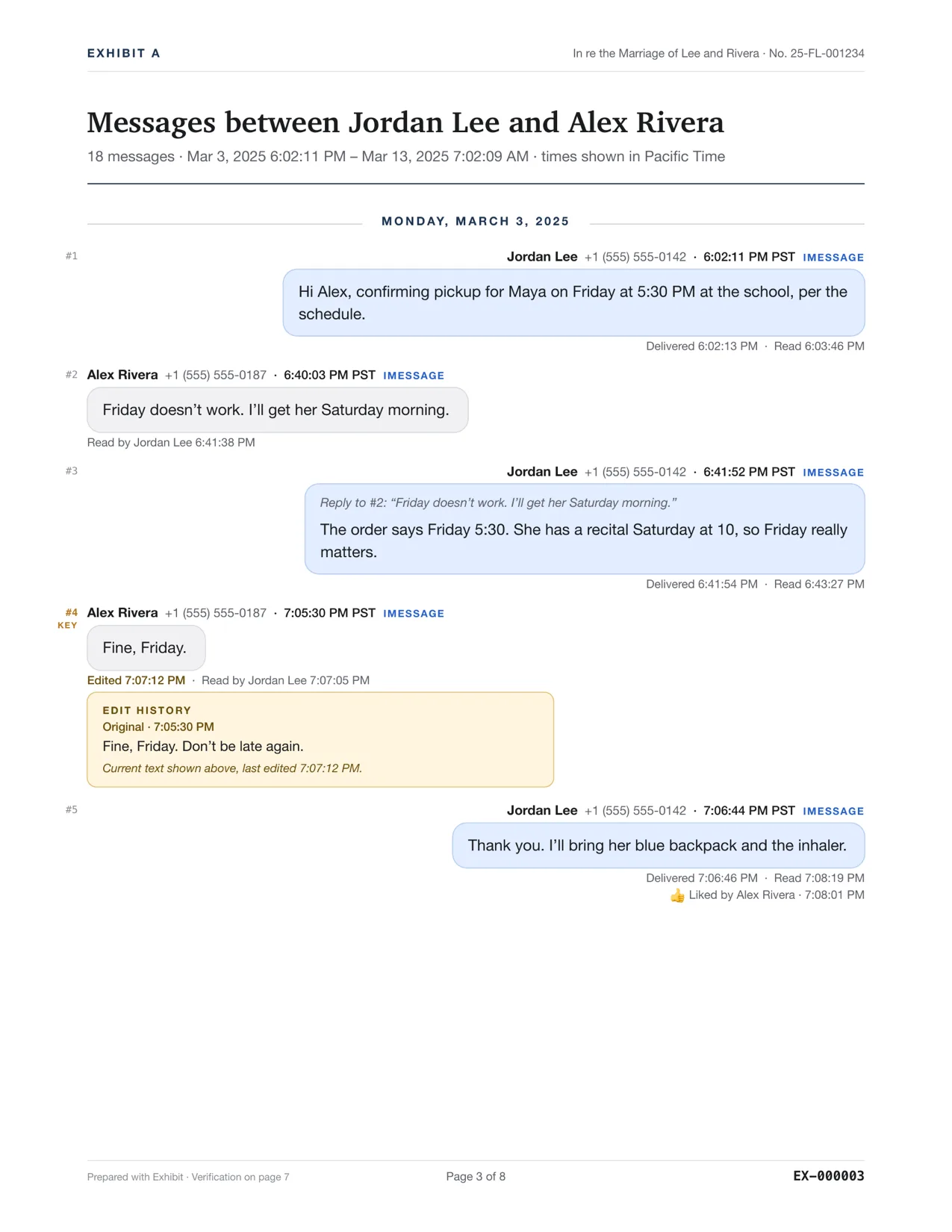
This is page 3 of a real exhibit, made by Exhibit from a sample conversation.
Every message to the second, with its time zone and daylight saving applied, so 9:41 PM can’t be read as 9:41 AM.
When each message reached the other phone and when it was opened, straight from the phone’s own records.
Cite #4 in a declaration and anyone can find it. Key messages get their own index page.
The original text, the time it was sent and the time it was changed. A screenshot shows only the final words.
Who reacted, with what, and when. Replies quote the message they answer.
A unique page number on every page, plus “Page 3 of 8”, the way court filings are paginated.
Formatted the way courts file paper.
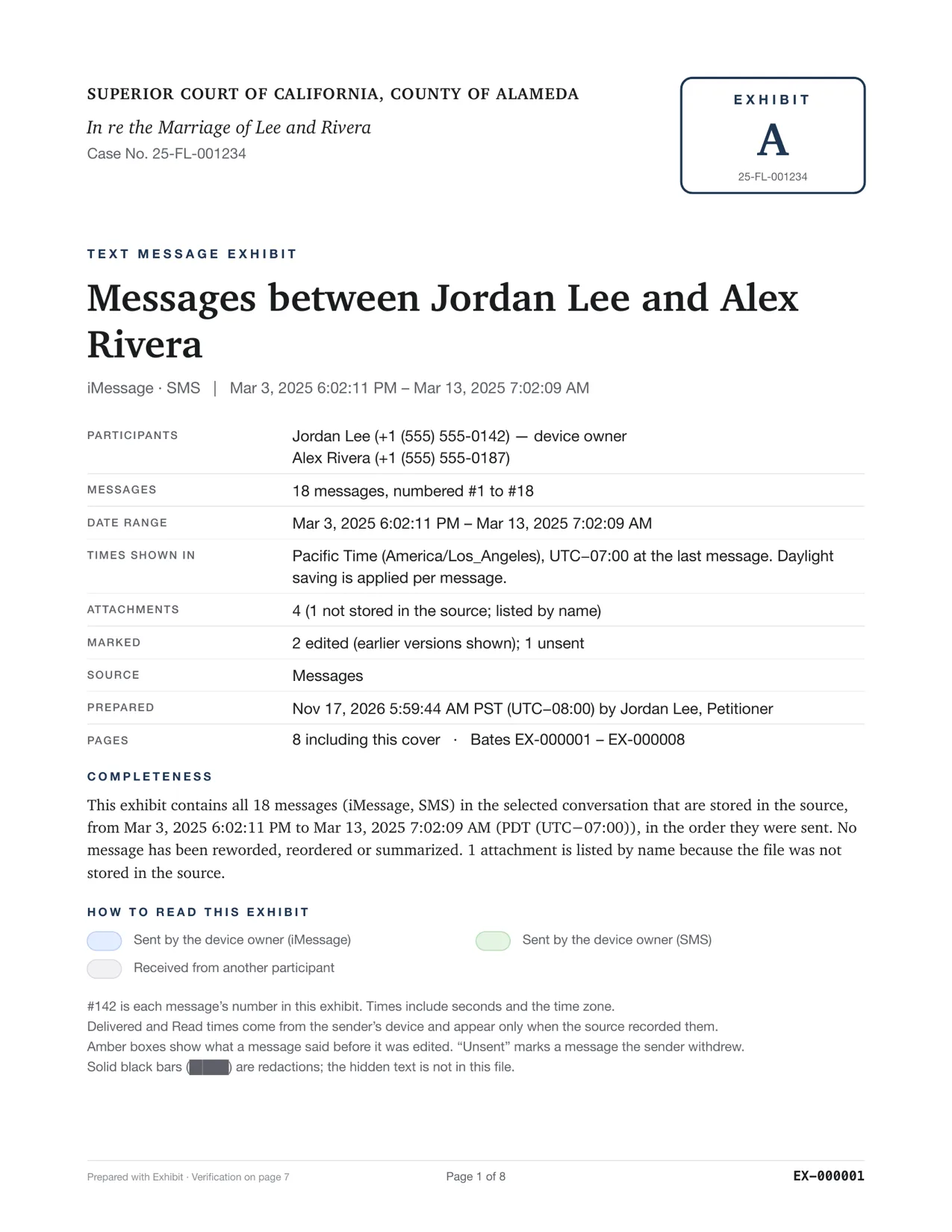
A cover page with your case caption, an exhibit stamp, Bates numbers and “Page 3 of 8” on every page, a completeness statement and a declaration template for people representing themselves.
- Participants
- Jordan Lee (+1 (555) 555-0142), device owner
Alex Rivera (+1 (555) 555-0187) - Messages
- 18 messages, numbered #1 to #18
- Times shown in
- Pacific Time (America/Los_Angeles)
- Marked
- 2 edited (earlier versions shown); 1 unsent
- Pages
- 8 including this cover · Bates EX-000001 – EX-000008
A fingerprint for every file.
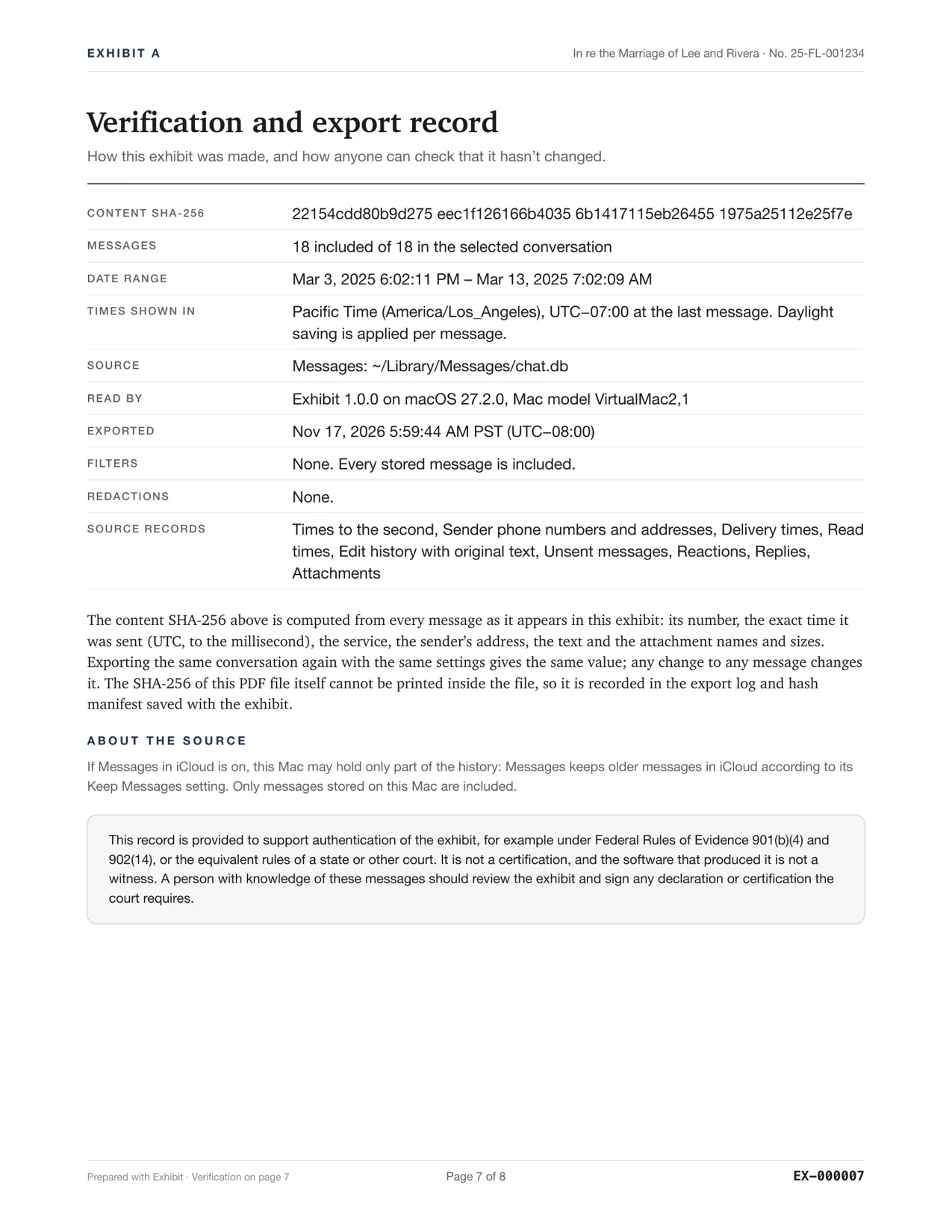
The last page lists SHA-256 fingerprints of the messages and of every file Exhibit wrote. Change one character anywhere and the fingerprint no longer matches, so anyone can check the exhibit is the one you made.
The verification page and export log support authentication under Federal Rules of Evidence 901 and 902(14). They don’t replace the declaration a court may ask you to sign, and Exhibit never calls its output “certified”.
Doesn’t match: this text was changed
shasum -a 256 -c"Hash manifest (SHA-256).txt"
Nothing leaves your Mac.
Exhibit reads the messages already on your Mac and writes the PDF to your disk. There is no upload, no account and no server that ever sees a conversation.
- No upload, no cloudVoice messages are transcribed with Apple’s on-device speech recognition, too.
- No accountExhibit goes online only to check a license key and look for updates.
- Password-protect the PDFAES-256 encryption for emailing an exhibit to your lawyer.
Friday doesn’t work. I’ll get Maya Saturday morning.
The order says Friday 5:30. Maya has a recital Saturday at 10, so Friday really matters.
Fine, Friday.
Every app they texted you on.
Messages, WhatsApp, Signal, Telegram and nine more. Each app keeps different records, so here is exactly what Exhibit can show from each one.
| App | Exact second | Phone or address | Delivered | Read | Edits | Unsent or deleted | Reactions | Replies | Attachments | Worth knowing |
|---|---|---|---|---|---|---|---|---|---|---|
 iMessage, SMS, RCSMessages on this Mac | Yes | Yes | Yes | Yes | Yes | Yes | Yes | Yes | Yes | Needs Full Disk Access |
 iMessage, SMS, RCSiPhone backup | Yes | Yes | Yes | Yes | Yes | Yes | Yes | Yes | Yes | Exhibit makes the backup; encrypted ones too |
 SignalSignal Desktop | Yes | Yes | Yes | Yes | Yes | Yes | Yes | Yes | Yes | What Signal Desktop has synced to this Mac |
 WhatsAppMac app or iPhone backup | Yes | Yes | Not recorded | Not recorded | Not recorded | Yes | Not recorded | Not recorded | Yes | Exact times and phone numbers |
| WhatsAppExport Chat .zip | Not recorded | Not recorded | Not recorded | Not recorded | Marked as edited, earlier text not kept | Yes | Not recorded | Not recorded | Yes | Names, not numbers; seconds only from iPhone |
 TelegramDesktop export | Yes | Not recorded | Not recorded | Not recorded | Marked as edited, earlier text not kept | Not recorded | Yes | Yes | Yes | Last edit time, not the original text |
 Android SMSSMS Backup & Restore | Yes | Yes | Not recorded | Not recorded | Not recorded | Not recorded | Not recorded | Not recorded | Yes | Sent and received times |
 MessengerMeta’s download | Yes | Not recorded | Not recorded | Not recorded | Not recorded | Yes | Yes | Not recorded | Yes | Names only |
 InstagramMeta’s download | Yes | Not recorded | Not recorded | Not recorded | Not recorded | Yes | Yes | Not recorded | Yes | Names only |
 Google VoiceGoogle Takeout | Yes | Yes | Not recorded | Not recorded | Not recorded | Not recorded | Not recorded | Not recorded | Yes | Texts, not calls or voicemail |
 DiscordData package | Yes | Not recorded | Not recorded | Not recorded | Not recorded | Not recorded | Not recorded | Not recorded | Not recorded | Only your own messages |
 SnapchatMy Data download | Yes | Not recorded | Not recorded | Not recorded | Not recorded | Not recorded | Not recorded | Not recorded | Yes | Only chats someone saved |
 Any appCSV file | Not recorded | Yes | Not recorded | Not recorded | Not recorded | Not recorded | Not recorded | Not recorded | Yes | As good as the file’s columns |
Add the same person’s WhatsApp or Signal thread to an iMessage exhibit and get one chronological record.
A merged exhibit shows only what every source in it has, and the last page lists what wasn’t available.
Exhibit reads a private copy of each database or export. Nothing is written back, and nothing is uploaded.
From conversation to exhibit tonight.
No setup, no account. Most threads export in seconds; a 10,000-message thread takes under two minutes.
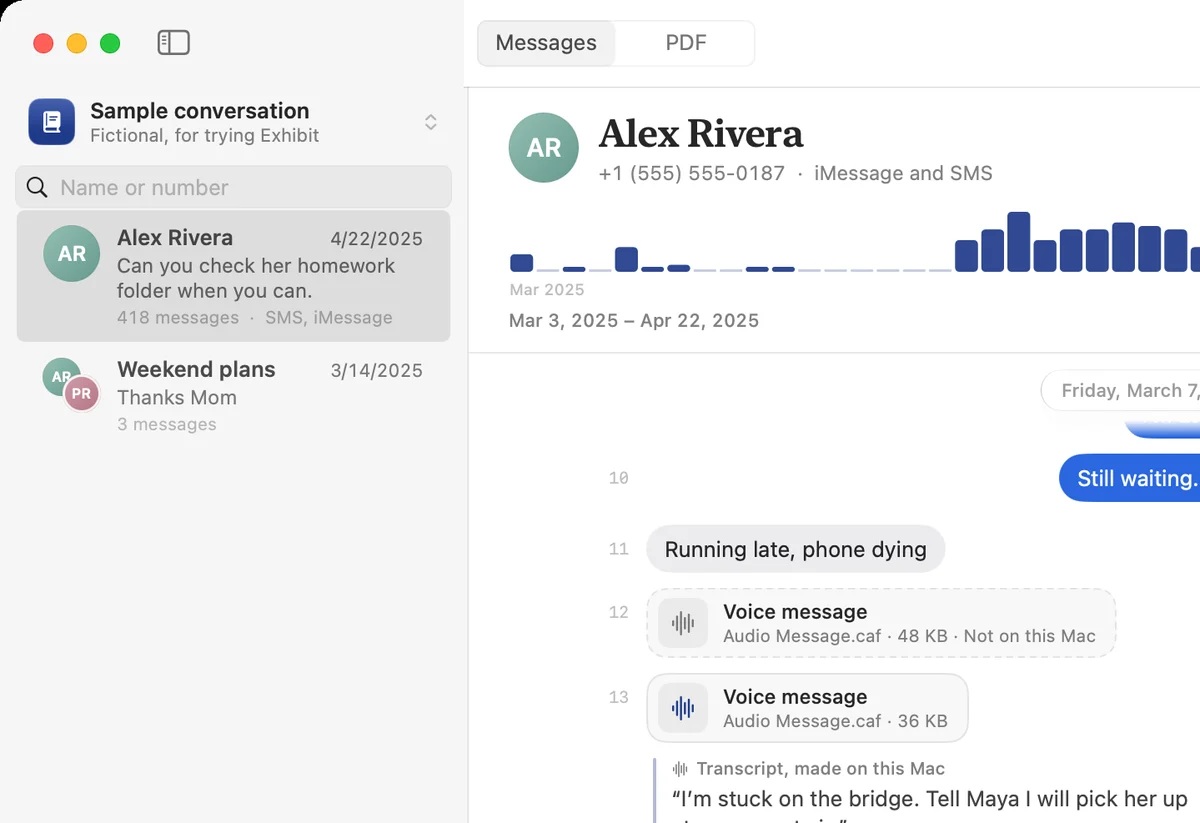
Pick the conversation
From Messages on this Mac, a plugged-in iPhone or a WhatsApp export. Search by name or number.
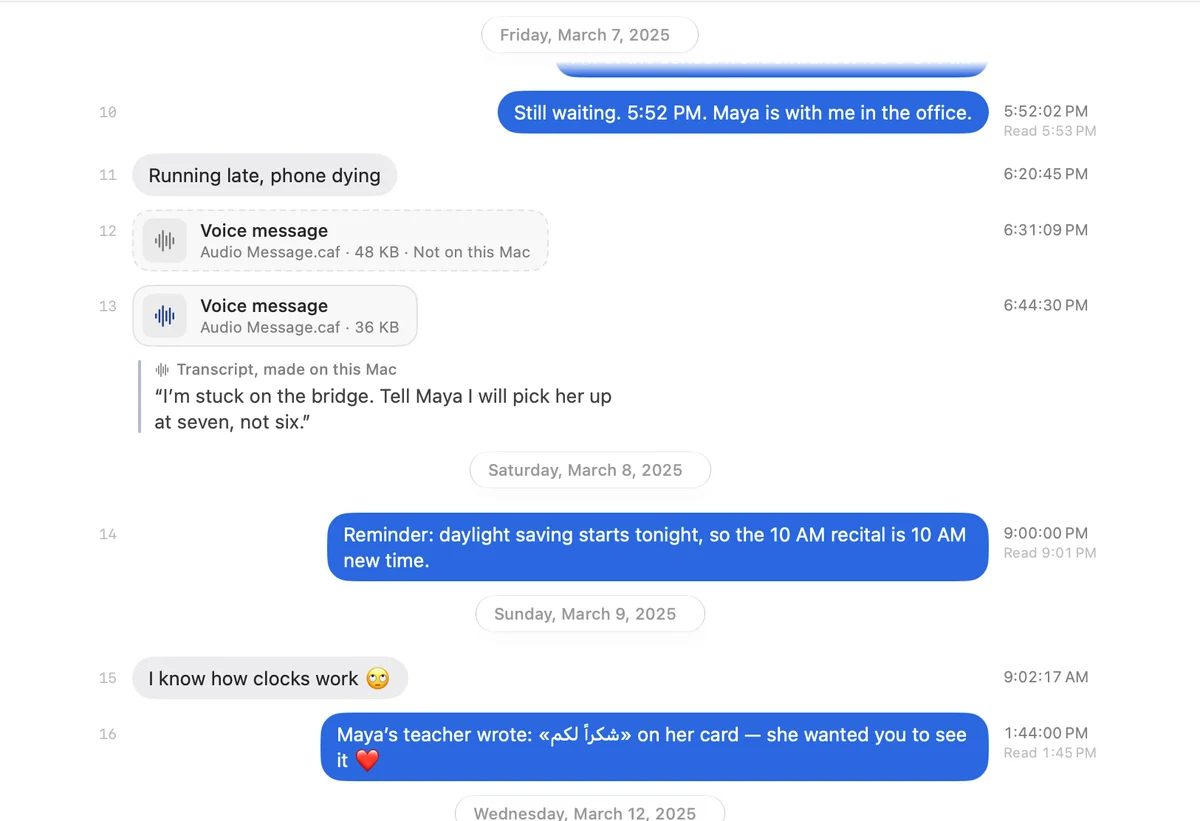
Check every message
Set the dates, keywords and redactions. Voice messages are transcribed right there, on your Mac.
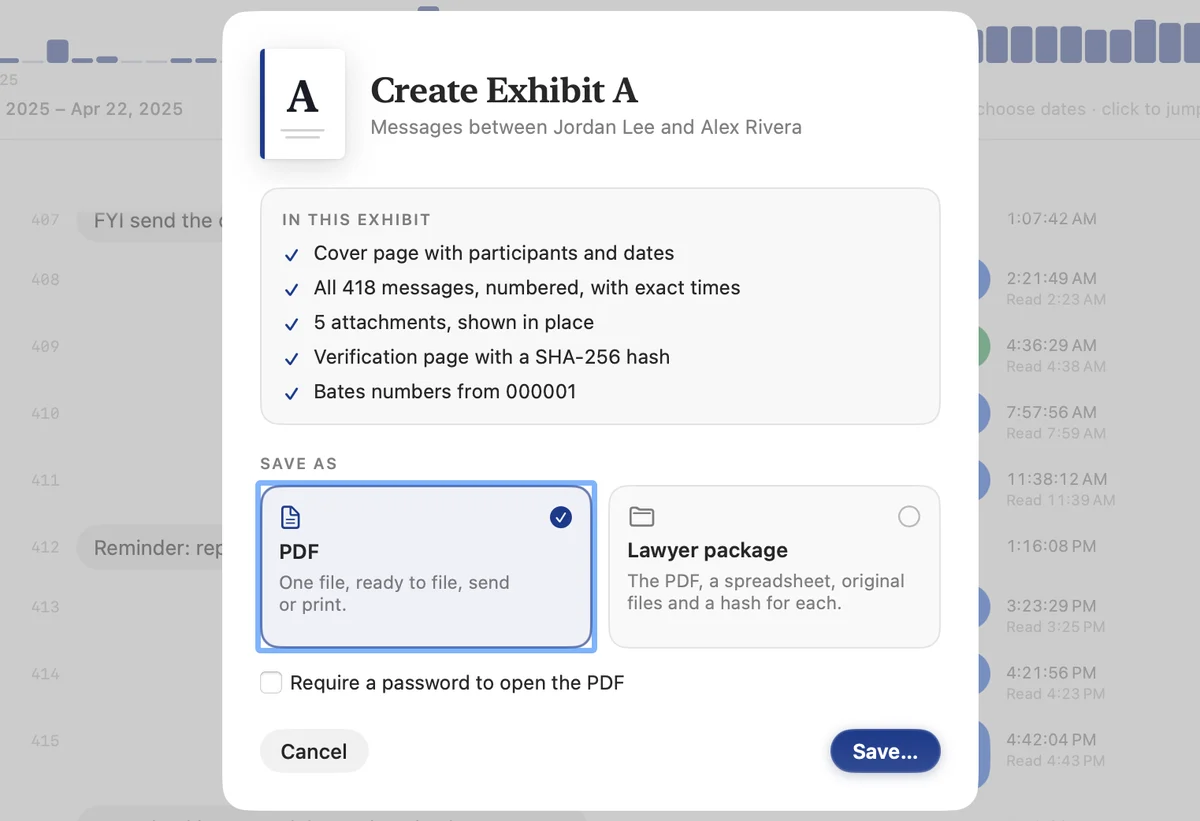
Preview the PDF, then save it
The full exhibit previews free. Pay once to save it clean, as one PDF or as a package for your lawyer.
Preview free. Pay once to export.
Read the complete exhibit before you spend anything. If Exhibit doesn’t work for your messages, you get your money back.
Competitor prices from their App Store listings and websites, November 2026. Lawyers and firms: the Firm license is $59.
Exhibit Personal
$19.99once
For your own case. No subscription, no renewals.
- Clean exports with no watermark
- Every source: Messages, WhatsApp, Signal, Telegram and more
- Lawyer package: PDF, spreadsheet, attachments, hash manifest
- Password-protected PDFs
- Activate on up to 3 Macs
- 7-day refund if it doesn’t work for your messages
Or download the free preview first.
Questions people ask before a hearing.
Something else? Read the guides or every answer.
How do I print text messages for court from an iPhone?
If you have a Mac, let your messages sync to it (Messages in iCloud), or plug the iPhone in and let Exhibit make a local backup. Then pick the conversation in Exhibit and export. You get one PDF with every message, its exact date, time and time zone, the sender’s number, delivered and read times, edits and attachments, numbered and paginated for court.
Screenshots work in a pinch, but they leave out times, edits and anything off screen, and long threads become hundreds of images.
Is a PDF from Exhibit admissible in court?
Admissibility is decided by the judge under your court’s rules, so no app can promise it. Exhibit gives you what courts usually look for: a complete, unaltered conversation with exact times and senders, page and Bates numbers, a completeness statement and a SHA-256 verification page that supports authentication under Federal Rules of Evidence 901 and 902(14). You (or the person who made the export) may still need to sign a declaration; Exhibit includes a fill-in template. When in doubt, ask your lawyer or your court’s self-help center.
Can Exhibit show that a message was edited or unsent?
Yes. When the Messages history on your Mac recorded an edit, the PDF prints the original text, each earlier version and the time of every change in an amber box under the message. Unsent messages are flagged with the time they were withdrawn. Screenshots and screenshot-stitching apps can’t show either.
Does it work with WhatsApp, Signal and other apps?
Yes. Exhibit reads WhatsApp for Mac, WhatsApp inside an iPhone backup (exact times and phone numbers) and the .zip from WhatsApp’s Export Chat on any phone. It also reads Signal Desktop, Telegram Desktop exports, Android texts saved with SMS Backup & Restore, Messenger and Instagram from Meta’s download, Google Voice, Discord, Snapchat and any CSV.
Each app keeps different records; the table on the home page shows exactly what each one can prove. Messages with the same person across apps can be merged into one timeline.
Do my messages get uploaded anywhere?
No. Everything happens on your Mac: reading the messages, transcribing voice messages, making the PDF. There is no account. Exhibit only goes online to check your license key and to look for app updates.
What does the free version do?
Everything, with a PREVIEW watermark across the PDF. You can open any conversation, set every option and read the complete exhibit before paying. A license ($19.99 once) removes the watermark and unlocks the lawyer package (PDF, spreadsheet, original attachments and hash manifest).
What if it doesn’t work for my messages?
Email us within 7 days of buying and we’ll refund you in full. Because the free preview shows the exact PDF first, you should never pay for an exhibit you haven’t seen.
Have the exhibit ready tonight.
Download Exhibit, open the conversation and read the whole PDF before you pay.