 Exhibit
How can I prove someone edited a text message?
Since iOS 16, iMessage lets a sender edit a message for 15 minutes, up to 5 times, and the Messages database on your Mac keeps each earlier version with the time of the change. Exhibit prints the original text and every edit in a box under the message. The record exists only when both sides used iOS 16 or later, or macOS 13 or later.
Updated November 17, 2026 · Not legal advice
How do iMessage edits work?
On iOS 16 and later, a sender can edit a message within 15 minutes of sending it, up to 5 times. The receiving phone shows the word Edited. Tapping it shows earlier versions. That history is stored with the message, so it can be read back later.
When does the original text exist?
The edit record exists only when both sides ran iOS 16 or later, or macOS 13 or later. If the other person is on an older system, they may see the new text with no trace of the old one. An SMS, which is a green bubble, cannot be edited at all. Check what you are looking at before you rely on it.
How do I show the original text and the edit times?
- Keep the conversation on the Mac. Do not delete the thread from Messages.
- Open Exhibit and pick the conversation. Set a Range that covers the edited message.
- Click Create Exhibit and open the PDF tab. Find the message.
- Look for the amber box under it. It lists the original text, each earlier version and the time of every change.
- Add the message to the key-messages page so the judge reaches it quickly.
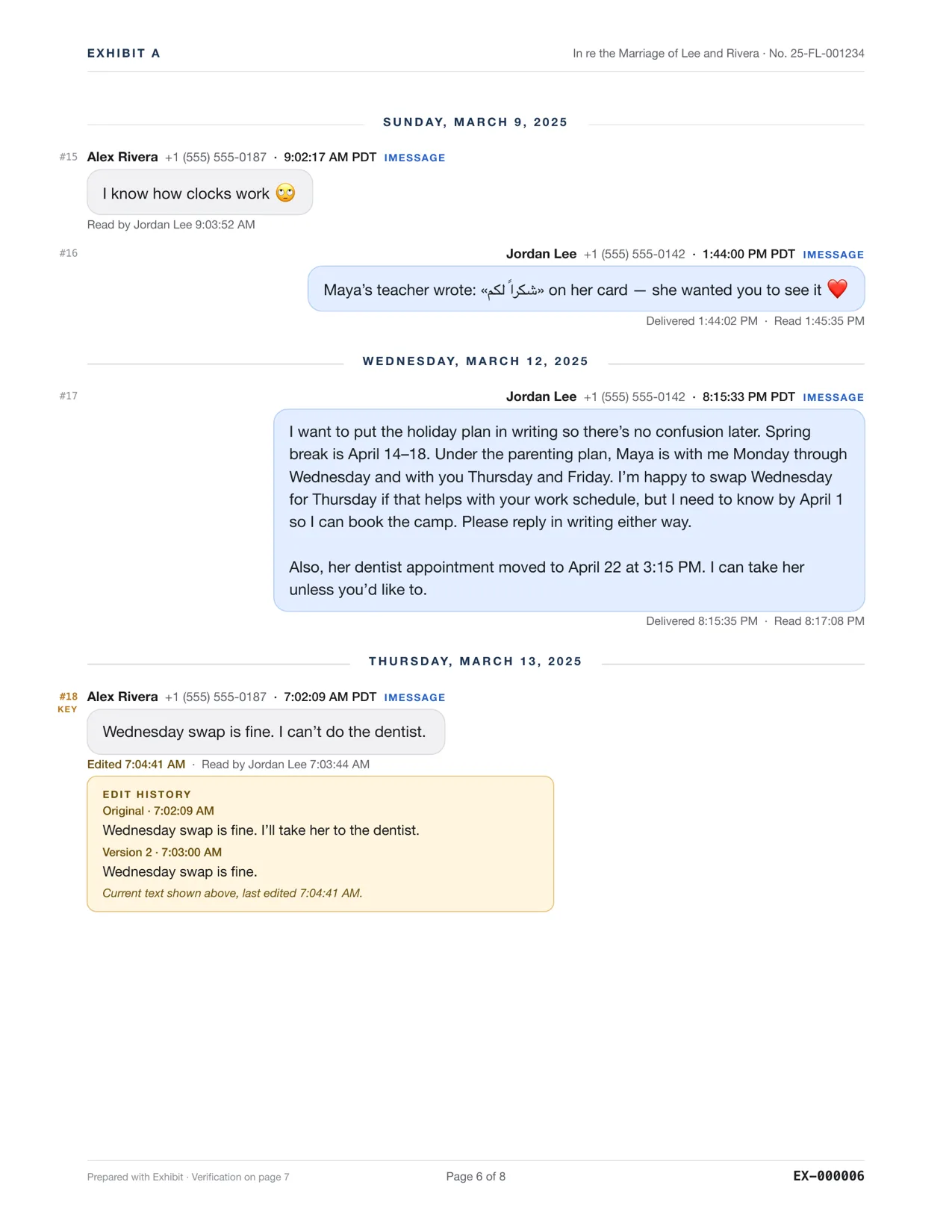
In the sample exhibit, on Mar 13, 2025 at 7:02:09 AM PDT, Alex Rivera writes: Wednesday swap is fine. I'll take her to the dentist. The message is edited twice, the last time at 7:04:41 AM. The amber box shows the original, each version and the time of each change, so the reader sees what was first said and when it changed.
What if I only have the iPhone?
Open the message, touch and hold it, and tap Edited to see the earlier versions on screen. A screenshot of that view is evidence of what you saw, but not of when each change happened. For the time of each change, use a Mac or a local iPhone backup that Exhibit can read.
What can the edit history tell a judge?
It can show that a sentence changed after it was sent, what it said first and how long afterward the change was made. In the sample, Alex Rivera first offers to take Maya to the dentist, then, under three minutes later, edits the message to say the opposite. A reader who sees only the final text would miss that. The edit box in the PDF lets the judge see both texts in order.
Keep your claims modest. The record shows a change, not the reason for it. Say what the PDF shows, and let the judge draw conclusions.
An edit history shows that the text changed and when. It does not by itself show who held the phone. To tie a message to a person, a witness with knowledge can testify under Federal Rule of Evidence 901(b)(1), or distinctive characteristics under 901(b)(4) can help. Courts differ, so ask a lawyer or the court clerk.
How do I show the PDF is the real record?
The last page of the exhibit is a verification page with SHA-256 hashes and an export record. It supports authentication, and a person who made the export can describe it in a declaration, see authenticating text messages. Related: unsent messages work the same way.
Questions
Can I see an edit if the other person edited it on their phone only?
Yes, if the edit was sent through iMessage. The edit travels to your device, and your Messages history records it when your software is iOS 16 or macOS 13 or later.
Can someone edit a message without a trace?
Not inside iMessage within the limits Apple sets. They cannot edit after 15 minutes, and after 5 edits the message is locked. Screenshots, however, can be altered, which is why a data export is stronger.