 Exhibit
How do I export iMessages to PDF for court?
On a Mac, open Exhibit, pick the conversation, choose a Range and click Create Exhibit. You get one PDF with the exact date, time and time zone on every message, numbered pages and a verification page. If you have no Mac, Apple's Print to PDF and screenshots are the fallback, and both leave out detail courts often ask about.
Updated November 17, 2026 · Not legal advice
What does a court-ready iMessage PDF need?
Courts differ, but most judges want the same things: the whole conversation, who sent each message, and when. A picture of a phone screen rarely shows all three. A good export shows the sender's number, the date, the time and the time zone on every message, in order, with no gaps.
It also helps to have page numbers, a note of what is included, and a way to show the file was not changed after you made it. Those are what authenticating text messages usually comes down to.
How do I export iMessages to PDF on a Mac?
- Open Messages on your Mac and check that the conversation you need is there. Scroll to the start of the thread to see how far back it goes.
- Download and open Exhibit. The first time, follow the Full Disk Access walkthrough so Exhibit can read the Messages database on this Mac.
- Pick the conversation from the list, or from the menu bar icon, which shows your recent conversations and has search.
- Set a Range, for example Jan 1, 2025 to Mar 31, 2025. Use Show to choose which kinds of content appear, such as photos or read times.
- Click Create Exhibit and read the PDF tab. The free preview is complete, with a PREVIEW watermark across each page.
- When the exhibit looks right, enter your key in Settings → License. The watermark goes and you can save the final PDF.
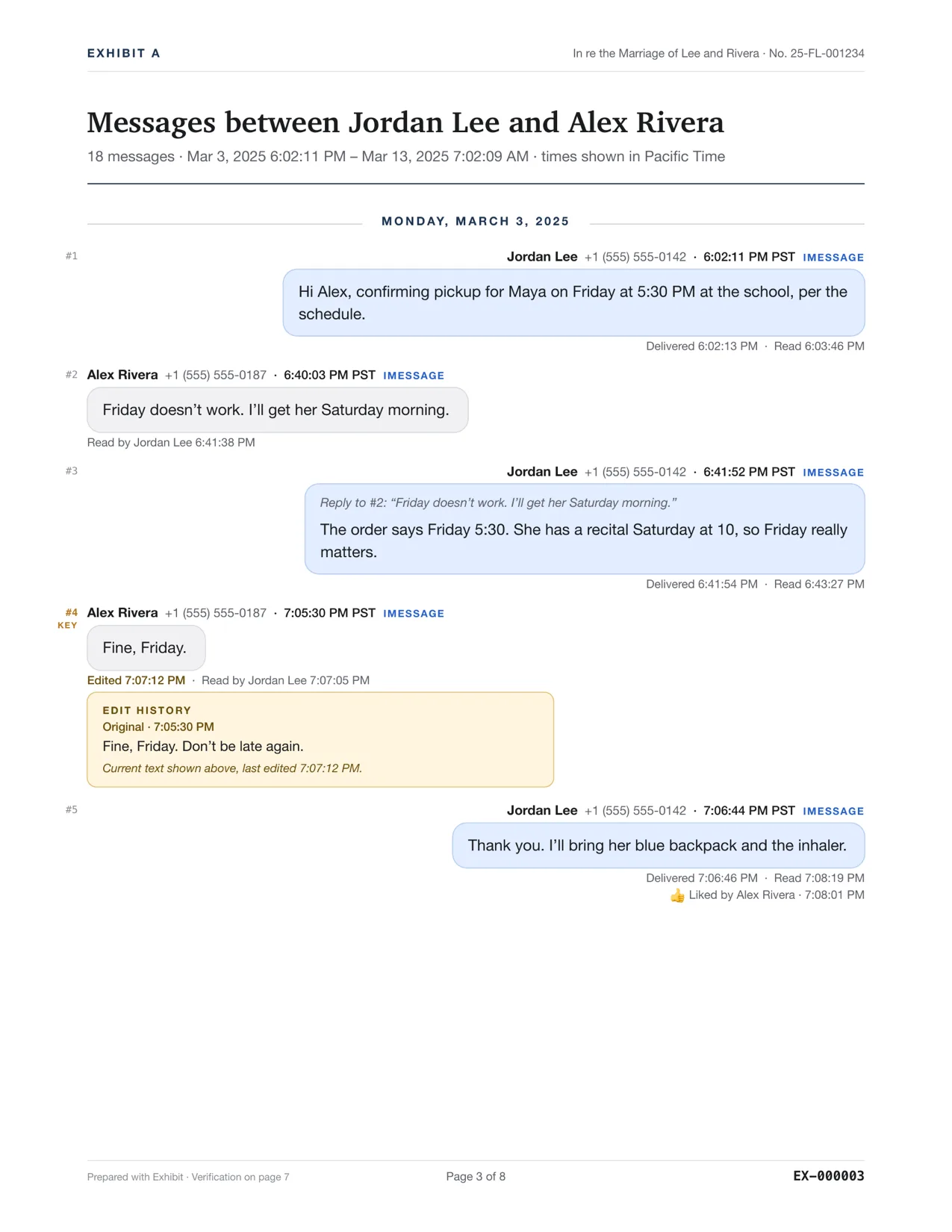
What is in the PDF?
Each message carries its exact time, for example Mar 3, 2025 7:05:30 PM PST, plus the sender's phone number. Delivered and read times appear under messages when your Mac recorded them. Edited messages show the original text, unsent messages are flagged, and replies, reactions and attachments sit where they happened. The PDF opens with a cover page and a key-messages page, and ends with a verification page showing SHA-256 hashes and an export record.
What if the Mac does not have the older messages?
A Mac only holds what Messages synced to it. If Keep Messages was set to 30 days or one year, or iCloud trimmed the thread, older messages are not on the Mac. In that case, plug in your iPhone and let Exhibit make a local backup, which holds the history the phone still has. Encrypted backups work with their password. See how to export your entire iMessage history.
Exhibit supports authentication; it does not replace it. Rule 902(14) of the Federal Rules of Evidence lets electronic records be certified by hash value, but a qualified person must still sign the certification. Rules differ by state and court, so ask the court clerk, a self-help center or a lawyer what yours expects.
What if I do not have a Mac?
You have three options: print from the iPhone, take screenshots, or borrow a Mac. Screenshots show only what was on screen, so you must capture every part of a long thread by hand and the times are easy to miss. Our guide to printing text messages from an iPhone compares them. Exhibit costs $19.99 once and the preview is free, see pricing.
Questions
Will the PDF show messages I deleted?
Only if the Mac or backup still holds them. Exhibit reads what Messages or the backup stored. It flags messages that were unsent, but it cannot bring back a message that was deleted from every copy.
How long does a big conversation take?
Exhibit is tested on threads of more than 10,000 messages. Run the free preview first so you can see the time and the page count before you pay.