 Exhibit
Why not just use Print to PDF in Messages?
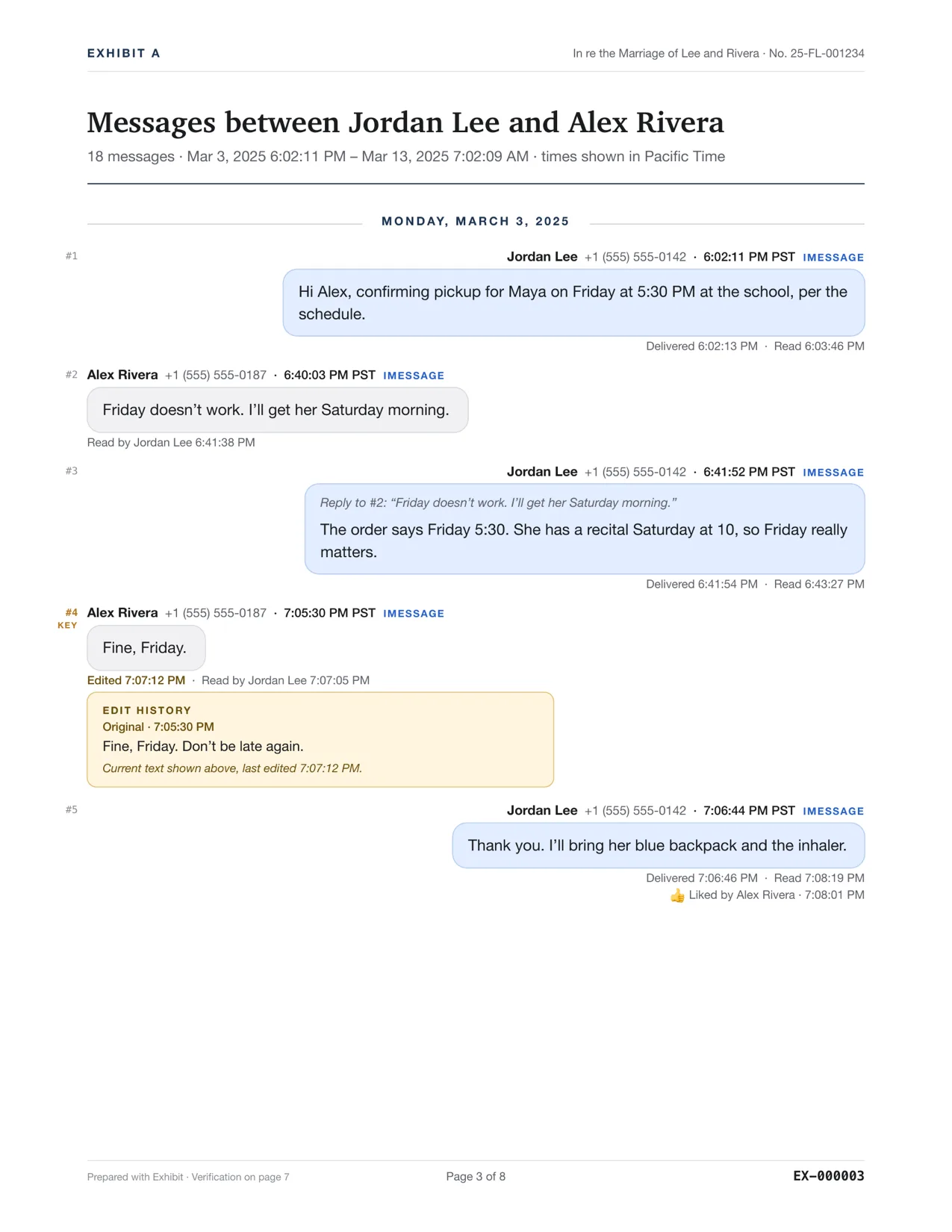
You can print a conversation from the Mac Messages app to PDF, and for a short thread it may be enough. It prints the conversation view the app has prepared, so a long thread needs scrolling and checking, and the printout is not designed to carry delivered, read or edit details, numbering or a verification page. Exhibit reads the Messages data itself and builds those into one PDF.
Updated November 17, 2026 · Not legal advice
What does Print to PDF in Messages do?
In the Mac Messages app, File, Print lets you save the open conversation as a PDF from the print dialog. It is free and built in. Apple's Messages User Guide does not describe printing a conversation, so there is no official statement of what the printout contains. The notes below come from users and a third-party vendor, and you should test your own thread.
| Exhibit | Messages, File, Print to PDF | |
|---|---|---|
| Price | $19.99 once (Personal), $59 once (Firm) | Included with macOS |
| Platform | Mac, macOS 14 or later | Mac |
| Sources | Messages on this Mac (iMessage, SMS, RCS), iPhone backup, WhatsApp, Signal, Telegram, Messenger, Instagram, Google Voice, Discord, Snapchat, Android SMS, CSV | Messages on this Mac |
| Exact time on every message | Yes: date, time and time zone, to the second where the source records seconds | Sources disagree on what times appear; test your own print |
| Edit history | Original text and each edit time for iMessage | Not stated by Apple |
| Read receipts | Delivered and read times for iMessage when the recipient had them on | Not stated by Apple |
| Bates and exhibit stamps | Bates numbers, Page X of Y, message numbers, exhibit stamp | Not stated by Apple |
| Verification hash | Verification page with SHA-256 and an export record | Not stated by Apple |
| Uploads or account | No account, no upload; online only for the license and update checks | Not stated |
| Free preview | Yes, complete, with a PREVIEW watermark | Not applicable, it is built in |
What should I check in a Messages printout?
A vendor that compares the two says Messages prints the conversation view that the app has prepared, and that long threads need manual scrolling. One user guide on Apple's support forum tells you to scroll to the oldest message you want before printing, and warns the dialog may be slow. In the vendor's own test of a long conversation, some text and pictures were cut off. Reports about timestamps differ. Treat all of this as a reason to test, not as a rule.
- Open the conversation in Messages and scroll to the first message you need. Wait until it loads.
- Choose File, Print, then Save as PDF.
- Open the PDF. Compare the first and last messages and a few in the middle against the app.
- Look for a date and time on every message you need, not only on some.
- Look for cut-off text or images, and for any gap between pages.
When is Print to PDF enough?
For a short thread where you only need the words and the dates, and where the other side does not dispute them, a careful printout can do. It costs nothing. It also lets you look at the whole thing before you decide whether you need more.
When do you need more?
- The thread is long, so you must prove nothing is missing between the first and last page.
- Times matter to the minute or second, or the time zone matters.
- You need delivered and read times, an edit history or an unsent flag.
- You want page numbers, Bates numbers, redaction or a verification page.
A printout is a copy of what you saw on screen. Ask the court clerk, a self-help center or a lawyer if your court accepts it without more, and read how to authenticate text messages. Not legal advice.
If you decide to export properly, see how to export iMessages to PDF for court. If you only have an iPhone, see printing text messages from an iPhone.
Questions
Does Messages print the whole thread at once?
Not reliably, according to the sources we found. Scroll to the start first, print, then check the first and last pages against the app.
Can I use Print to PDF and Exhibit together?
Yes. A quick printout can help you find the dates you need, then Exhibit builds the numbered exhibit for those dates.
Sources
- Apple Support Communities: printing or exporting a long Messages conversation
- MothSoftware: Printing a Messages conversation to PDF on Mac
- Apple Support: Messages User Guide
Competitor details were checked on 2026-11-17 and can change. Tell us at the contact address if something here is out of date and we will fix it.