 Exhibit
What is the best app to export iPhone messages on a Mac?
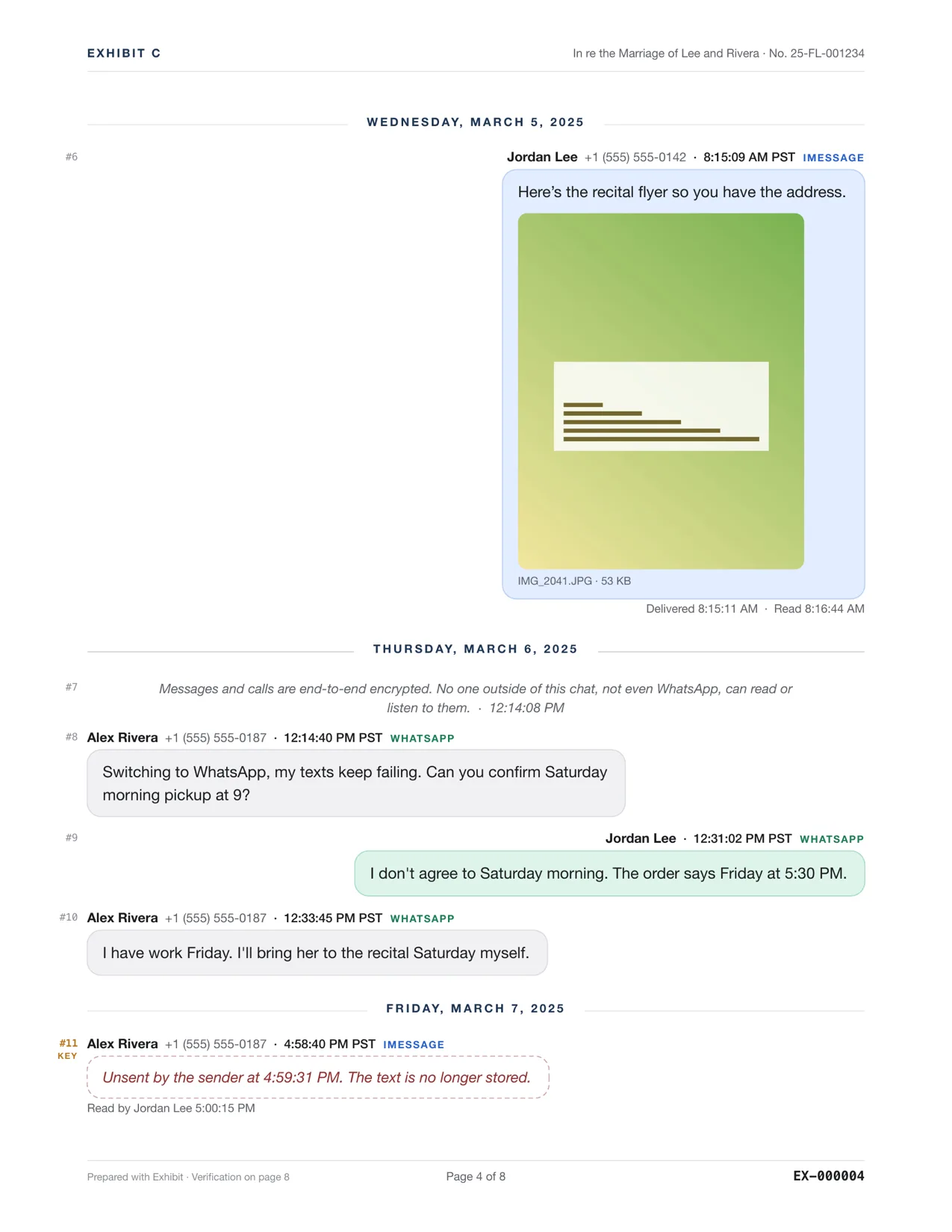
For messages, Exhibit is the best pick on a Mac: $19.99 once, it exports iMessage, SMS, WhatsApp, Signal, Telegram and more into one PDF with the exact time on every message, photos inline and read receipts, and it can back up the iPhone itself over a cable. Pick iMazing or TouchCopy if you also want to move music, photos and files, or need Windows. Pick imessage-exporter if you want free HTML and are happy in Terminal.
Updated November 17, 2026 · Not legal advice
How do the message-export apps compare?
Prices come from each vendor's own store page on November 17, 2026. Sale prices change; check before you buy. Where a page does not say, the table says Not listed.
| Price | Model | Message apps | Windows | ||
|---|---|---|---|---|---|
| Exhibit | $19.99 | Once | iMessage, SMS, RCS, WhatsApp, Signal, Telegram, Android SMS, Messenger, Instagram, Google Voice, Discord, Snapchat, CSV | Yes, one merged timeline | No |
| iMazing | $49.99 a year (5 devices) | Subscription | Messages, WhatsApp | Yes | Yes |
| TouchCopy | $70 lifetime (2 Macs), or $40 for 12 months | Once or time-limited | SMS, RCS, iMessage, WhatsApp, LINE | Yes | Yes |
| Decipher TextMessage | $29.99 (+ $19.99 Decipher Chat for WhatsApp) | Once | iMessage, SMS, MMS; WhatsApp in a second app | Yes | Yes |
| iExplorer | $39.99 (1 license) | Once | SMS, iMessage | Yes, per its tutorial | Yes; needs iTunes |
| AnyTrans | $59.99 once, or $39.99 a year (sale prices on Nov 17, 2026) | Once or subscription | Messages, WhatsApp, LINE, Viber | Yes | Yes |
| TextDocket | $14.99 (free to try) | Once | iMessage and SMS on the Mac | Yes | No |
| Chat to PDF for iMessage | $20 (WhatsApp is a separate $20 app) | Once | iMessage and SMS | Yes | No |
| imessage-exporter | Free | Open source | iMessage, SMS, RCS | No (HTML or text) | Yes |
Exhibit for Mac turns the conversation into a PDF you can file: exact times, read receipts, edits, Bates numbers. $19.99 once, no subscription, 7-day refund.
Why is Exhibit the best for messages?
- Every app in one file. A conversation often runs across iMessage, WhatsApp and Signal. Exhibit merges them into one timeline. Decipher and Chat to PDF sell WhatsApp as a separate app.
- What the phone keeps, not just what it shows. The exact time on every message, delivered and read times, the original text of edited messages, and unsent messages flagged (iMessage and Signal).
- Android too. It reads Android SMS Backup & Restore files, so an Android phone and an iPhone can go in the same PDF.
- No iTunes. Plug in the iPhone and Exhibit makes the local backup itself, encrypted backups included.
- One price. $19.99 once for every source, with a 7-day refund. No subscription.
- Court-ready when you need it. Bates numbers, Page X of Y, redaction and a SHA-256 verification page. TextDocket also has Bates numbers and hashes, for iMessage and SMS only.
Where is another app the better choice?
- You use Windows: iMazing, TouchCopy, Decipher, iExplorer and AnyTrans run on Windows. Exhibit is Mac only.
- You want to move music, photos, contacts and files too: iMazing, TouchCopy and AnyTrans are full iPhone managers. Exhibit only does messages.
- You want HTML, not PDF: imessage-exporter is free and makes good HTML archives, from the command line.
- You have only an iPhone and no computer: an iPhone app such as TextPort, on its subscription.
Looking for something else? PhoneView is no longer updated; Dr.Fone and iMyFone are broader phone toolkits sold by subscription or lifetime plan; and there are free ways to export iMessages if a short thread is all you need.
How do I export iPhone messages with Exhibit?
- Buy and open Exhibit on your Mac. Give it Full Disk Access when it asks, so it can read Messages.
- Pick the conversation. If it is not on the Mac, plug in the iPhone and let Exhibit make a backup.
- Optionally add the same person's WhatsApp or Signal chat to the same PDF.
- Set a date range and click Create Exhibit, then save the PDF.
See export text messages from iPhone to PDF for the full steps, and the sample PDF for the result.
Questions
What is the cheapest way to export iPhone messages to PDF on a Mac?
imessage-exporter is free but makes HTML, not PDF. TextDocket is $14.99 once for iMessage and SMS only. Exhibit at $19.99 once is the cheapest that covers iMessage and WhatsApp in one app; Chat to PDF is $20 per app.
Is there a one-time purchase alternative to iMazing for messages?
Yes. Exhibit is $19.99 once. TouchCopy has a $70 lifetime license, Decipher TextMessage is $29.99 once and AnyTrans has a $59.99 one-time plan.
Can I export messages from an Android phone on a Mac?
Yes. Back up the texts with the SMS Backup & Restore app on Android, copy the file to the Mac and open it in Exhibit. WhatsApp chats from Android work through Export Chat.
Do any of these upload my messages?
Exhibit runs entirely on the Mac: no account and no upload. It goes online only to check the license and for updates.
Sources
- iMazing Store
- TouchCopy for Mac: purchase page
- Decipher TextMessage
- Decipher Chat
- iExplorer 4 pricing
- AnyTrans store page
- TextDocket for Mac
- Chat to PDF for iMessage
- imessage-exporter on GitHub
Competitor details were checked on 2026-11-17 and can change. Tell us at the contact address if something here is out of date and we will fix it.