 Exhibit
How do I export text messages from my iPhone to PDF?
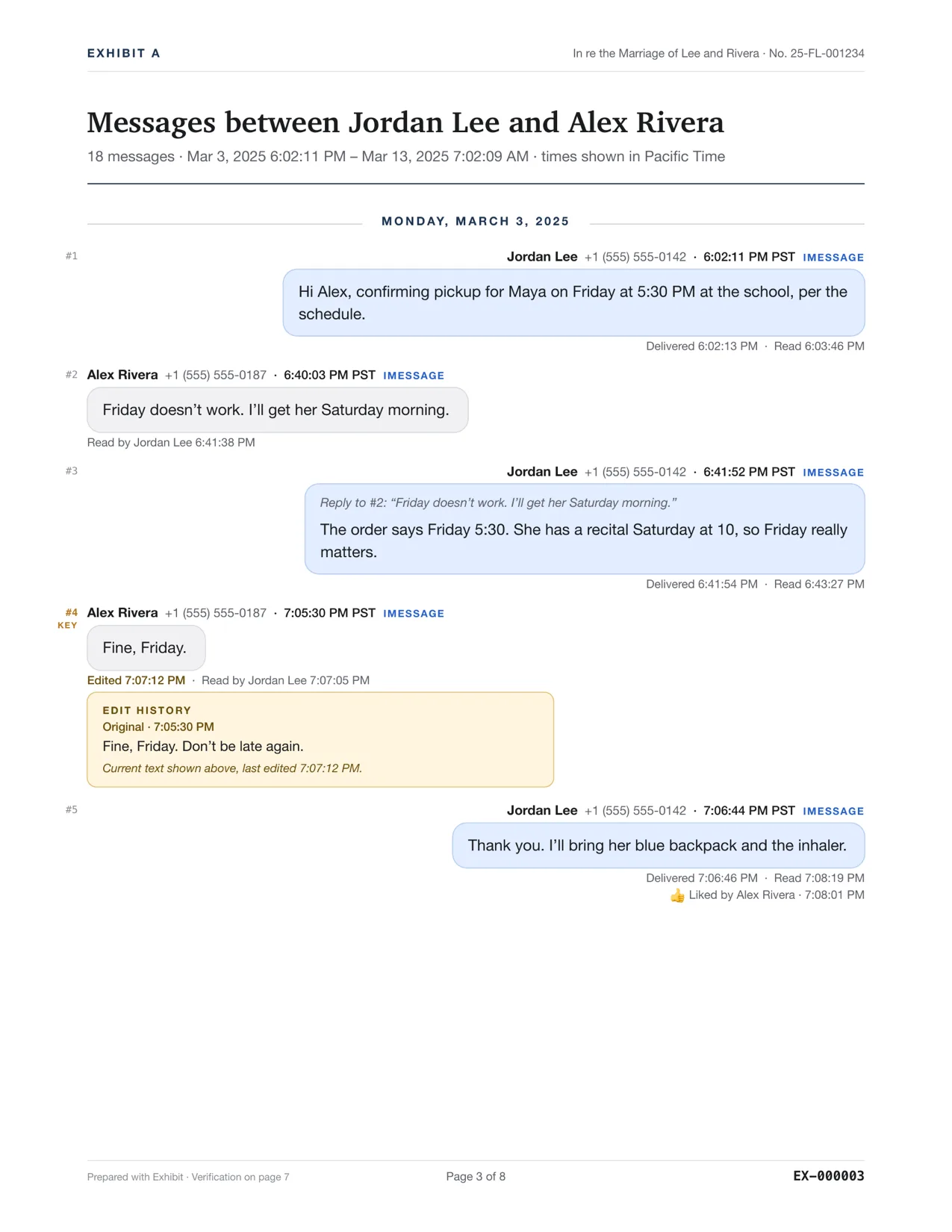
The iPhone has no built-in way to export a conversation to PDF. If you have a Mac, the most accurate way is to let Messages sync to it, or have Exhibit make a local backup of the iPhone, then create one PDF with the exact date and time on every message, for $19.99 once. Without a Mac, you can stitch screenshots into a PDF or use a subscription iPhone app.
Updated November 17, 2026 · Not legal advice
What are the options?
| Method | Time on every message | Whole thread | Cost |
|---|---|---|---|
| Screenshots, then Print to PDF | No | Only if you capture every screen | None |
| iPhone export apps | Varies; many read the screen | Varies | Often weekly or yearly subscriptions |
| Exhibit on a Mac | Yes, with time zone | Yes, from the Messages data or a backup | $19.99 once |
Exhibit for Mac turns the conversation into a PDF you can file: exact times, read receipts, edits, Bates numbers. $19.99 once, no subscription, 7-day refund.
How do I do it with a Mac?
- On the iPhone, turn on Settings → your name → iCloud → Messages so the thread syncs to your Mac. Or skip this and use a cable.
- On the Mac, open Exhibit. Follow the Full Disk Access step the first time.
- Pick the conversation. If it is not on the Mac, plug in the iPhone and let Exhibit make a local backup; encrypted backups work with their password.
- Set a Range and click Create Exhibit.
- Save the PDF. It has page numbers, the sender's number on each message and a verification page.
Why not just screenshot?
Screenshots show a time only when the day changes or a gap passes, cannot show read times or edits, and leave room to ask what was cropped. For a personal keepsake they are fine. For a lawyer or a judge, see are screenshots admissible.
Questions
Can I export iPhone texts to PDF without a computer?
Only with screenshots or an iPhone app. Apple does not offer a built-in export.
Does this work with an iPad?
If the iPad's messages sync through iCloud to a Mac, Exhibit reads them on the Mac.
Will it include photos?
Yes. Photos and videos appear inline or in an appendix, and the original files go in the lawyer package.