 Exhibit
How do I redact phone numbers and names in text messages?
In Exhibit, use Redact to black out phone numbers, emails, specific words such as a child's name, or whole messages. The PDF shows black bars, and a page at the end lists every redaction. Redacted text is removed from the PDF and from the spreadsheet in the lawyer package, so keep your unredacted original for yourself.
Updated November 17, 2026 · Not legal advice
Why would I redact a text message exhibit?
Court filings are often public. A text thread can hold a child's name, a school, a home address, an account number or a third person's phone number. Courts commonly ask you to hide some of these. In federal civil cases, Federal Rule of Civil Procedure 5.2 asks for a minor's initials instead of a full name, and state courts have their own rules. Check what applies to your case.
How do I redact in Exhibit?
- Open Exhibit, pick the conversation and set a Range, for example Jan 1, 2025 to Mar 31, 2025.
- In the inspector, open Redact. Choose what to hide: phone numbers, emails, words, or whole messages.
- To hide a child's name, type Maya into the box that says Add a word or name to black out. Add nicknames and spellings the family uses, because each one has to be listed.
- Click Create Exhibit and read the PDF tab page by page. Look for any version of the name you missed.
- Check the redaction list near the end of the PDF. It lists what was redacted.
- Enter your license key in Settings → License and save the final PDF.
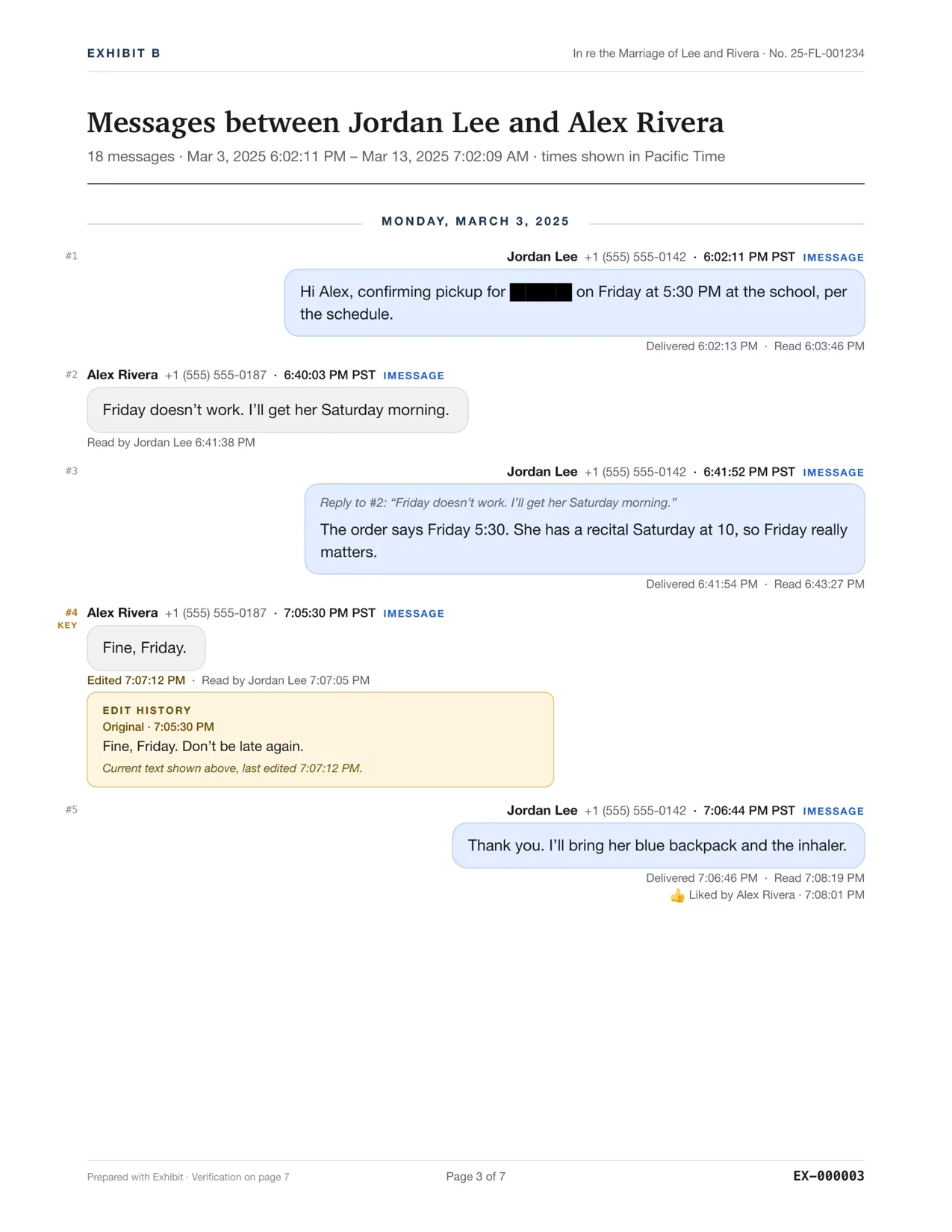
What does the redacted PDF look like?
Redacted text appears as solid black bars in the transcript, so the reader can see that something is hidden and how much. A redaction page lists what was redacted. The sender line for a hidden phone number also shows black blocks. The message numbers, dates and times stay, so the reader can still follow the order.
Is the redacted text really gone?
Exhibit removes redacted text from the PDF rather than covering it up. The spreadsheet in the lawyer package uses the same redacted text as the PDF. Still, open the final PDF, try to select and search for the hidden word, and check that it cannot be found. Do this before every filing.
Redaction hides content from readers of the filed copy. It does not make the content go away on your Mac. Keep the unredacted original so you can answer a judge or the other side, and ask the clerk, your court's self-help center or a lawyer which items your court requires you to redact and whether you must file a sealed copy. Not legal advice.
How does redaction affect the verification page?
The verification page covers the content as exported, redactions included. Its SHA-256 hashes describe the redacted exhibit, so you can show that the file you filed is the file you made. They do not describe your unredacted original. If someone asks to see the unredacted thread, export it separately and keep both exports with their verification pages.
What should I redact, and what should I leave?
- Redact personal identifiers the court asks you to hide, such as a child's full name, a home address or an account number.
- Do not redact words just because they are unflattering. Hiding the meaning of a conversation can look like concealing evidence.
- Redact the same item the same way everywhere, so the exhibit stays consistent.
For custody cases, see organizing co-parenting texts. To make every page citable after you redact, see Bates numbering.
Questions
Can I redact a whole message?
Yes. Redact lets you hide whole messages as well as numbers, emails and words. The black bar and the numbering stay, so the order of the conversation is clear.
Will redacting change the Bates numbers?
No. Numbering is applied to the pages of the finished exhibit, and the redaction list shows what was hidden.