 Exhibit
How do I export iMessages to PDF on a Mac?
Open the conversation in Exhibit, set the date range, and click Create Exhibit: you get one PDF of the whole thread, with the date and time on every message and photos where they were sent. Messages' own File, Print can save a PDF too, but only of what is loaded on screen, so long threads come out incomplete. Exhibit reads Messages on your Mac, or a local iPhone backup it makes itself, and costs $19.99 once.
Updated November 18, 2026 · Not legal advice
Steps
- Download Exhibit from chatexhibit.me and open it. It needs macOS 14 or later.
- The first time, Exhibit walks you through Full Disk Access, which macOS requires for any app that reads the Messages history on your Mac.
- Pick the conversation in the sidebar. Search by name or number if the list is long.
- Set the Range: all dates, or for example Jan 1 to Jun 30, 2025. Choose whether photos and voice messages appear inline.
- Click Create Exhibit, read the PDF, then save it.
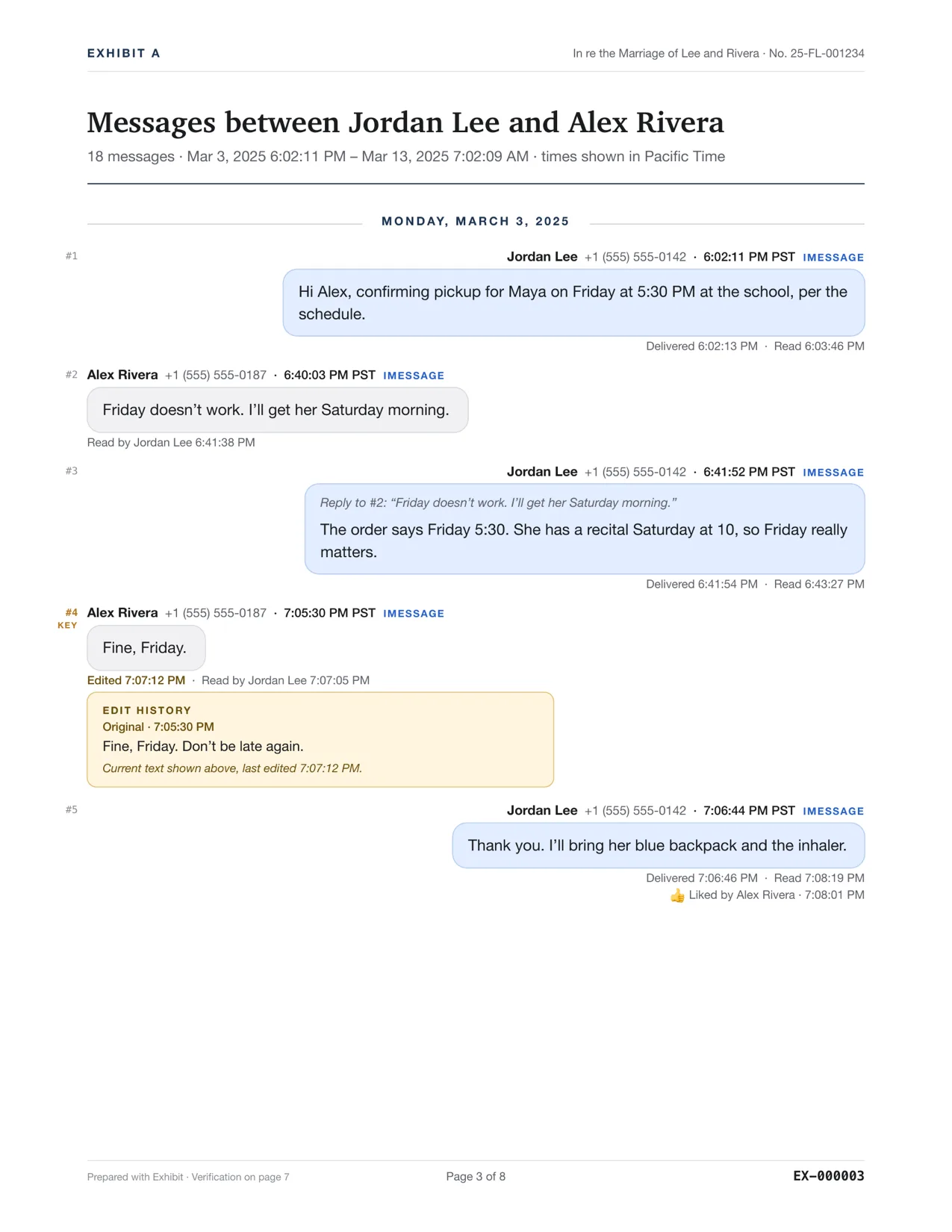
Exhibit for Mac turns the conversation into a PDF you can file: exact times, read receipts, edits, Bates numbers. $19.99 once, no subscription, 7-day refund.
What if the Mac doesn't have the whole conversation?
The Mac holds only what Messages in iCloud has synced to it. If older messages are missing, plug in the iPhone and let Exhibit make a local backup of it. Exhibit reads the messages straight from that backup, encrypted or not. See exporting your entire iMessage history.
What goes in the PDF?
- Every message in the range, with sender, date, time and time zone.
- Photos and other attachments inline, where they were sent.
- Delivered and read times, edits with the original text, and unsent messages, when Messages recorded them.
- Page numbers and a verification page with a SHA-256 hash of the PDF, so you can show later that it was not changed.
Why not File, Print in Messages?
It is free and fine for a few screens. It prints the part of the thread the app has loaded, so for a long conversation you have to scroll back first and check the result. It is not designed to show read or edit details. See Print to PDF in Messages for a side-by-side.
Need the PDF for a court case? The same export adds Bates numbers, a case caption and redaction: see iMessage to PDF for court.
Questions
Can I export all my iMessage conversations at once?
Exhibit exports one conversation per PDF. Repeat it for each person, or merge the same person's iMessage, SMS and WhatsApp into one timeline.
Are my messages uploaded?
No. Exhibit reads and writes everything on your Mac, with no account. It goes online only to check the license key and look for updates.
Is there a free version?
No. Exhibit is $19.99 once for personal use, with a 7-day refund if it doesn't work for your messages.