 Exhibit
How do I save text messages from my iPhone to my Mac?
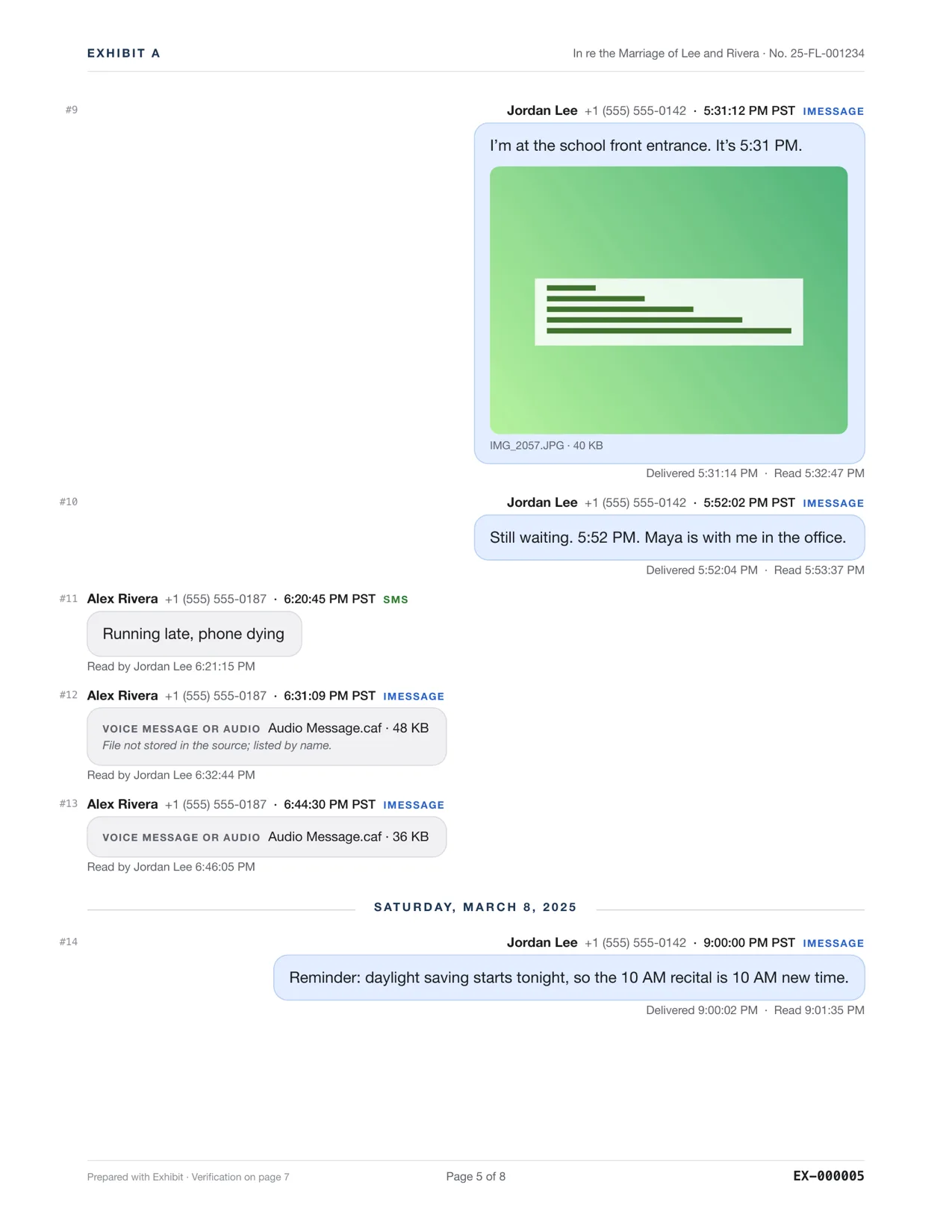
Turn on Messages in iCloud on both the iPhone and the Mac, and the whole history syncs to the Mac's Messages app. For a copy that cannot be trimmed or deleted later, also save the conversations that matter as a PDF. On a Mac, Exhibit makes that PDF, with every message's date and time, photos inline and a verification page, or makes a local backup of the iPhone and reads that.
Updated November 17, 2026 · Not legal advice
Option 1: Messages in iCloud
- On the iPhone: Settings → your name → iCloud → Messages (Messages in iCloud) on.
- On the Mac: Messages → Settings → iMessage → Enable Messages in iCloud.
- Leave both on Wi-Fi. A long history can take hours to arrive.
- Set Keep Messages to Forever on the iPhone so nothing is trimmed.
Messages in iCloud keeps devices in step, which also means a deletion on one deletes everywhere. It is a sync, not an archive.
Exhibit for Mac turns the conversation into a PDF you can file: exact times, read receipts, edits, Bates numbers. $19.99 once, no subscription, 7-day refund.
Option 2: a local backup
In Finder, select the iPhone and back up all data to this Mac. Encrypt the backup to include more data. A backup is a snapshot, but you cannot read messages in it without a tool. Exhibit can make the backup for you and read the messages straight from it.
Option 3: a PDF you can keep
For a conversation that matters, such as a dispute or a loved one's messages, save it as a PDF. Exhibit exports the whole thread with dates, times, photos and voice-note transcripts, and the PDF does not change if the phone is lost or iCloud trims history.
Questions
Can I save texts from someone who passed away?
Yes. If the conversation is on your iPhone or Mac, export it to PDF so it does not depend on a phone or an iCloud setting. Voice messages can be transcribed and kept with their audio.
Does syncing to the Mac use iCloud storage?
Yes, Messages in iCloud counts against your iCloud storage.