 Exhibit
How do I export Signal messages for court?
Signal on a phone has no export, but Signal Desktop on your Mac keeps a local copy of what it has synced, and Exhibit can read it. Open Exhibit, choose Other apps, then Signal Desktop, and allow the Keychain prompt. The PDF includes delivered and read times, edits, reactions, replies and attachments, but only for messages Signal Desktop actually holds.
Updated November 17, 2026 · Not legal advice
Can I export Signal from my phone?
Not directly. The Signal app on a phone has no export for a conversation. What you can do is link Signal Desktop to your phone. Signal Desktop stores the messages it has synced in a database on your Mac, and Exhibit reads that database. Nothing is sent to Signal or to Exhibit.
How do I export a Signal conversation with Exhibit?
- Install Signal Desktop on your Mac and link it to your phone. On the phone, go to Signal, Settings, Linked devices. When Signal offers to transfer your message history, accept it. If you skip that, only messages from after linking are on the Mac.
- Give Signal a little time to sync, then quit Signal Desktop so it is not writing to its database.
- Open Exhibit and choose Other apps, then Signal Desktop.
- macOS asks whether Exhibit may use Signal Safe Storage from your Keychain, and asks for your Mac login password. Enter it and choose Allow. This is the key Signal Desktop uses to protect its own data. Exhibit decrypts the copy on your Mac and nothing leaves it.
- Pick the conversation, set a Range such as Mar 1, 2025 to Mar 31, 2025, and choose what to Show.
- Click Create Exhibit and read the PDF tab. Enter your license key in Settings → License to remove the PREVIEW watermark.
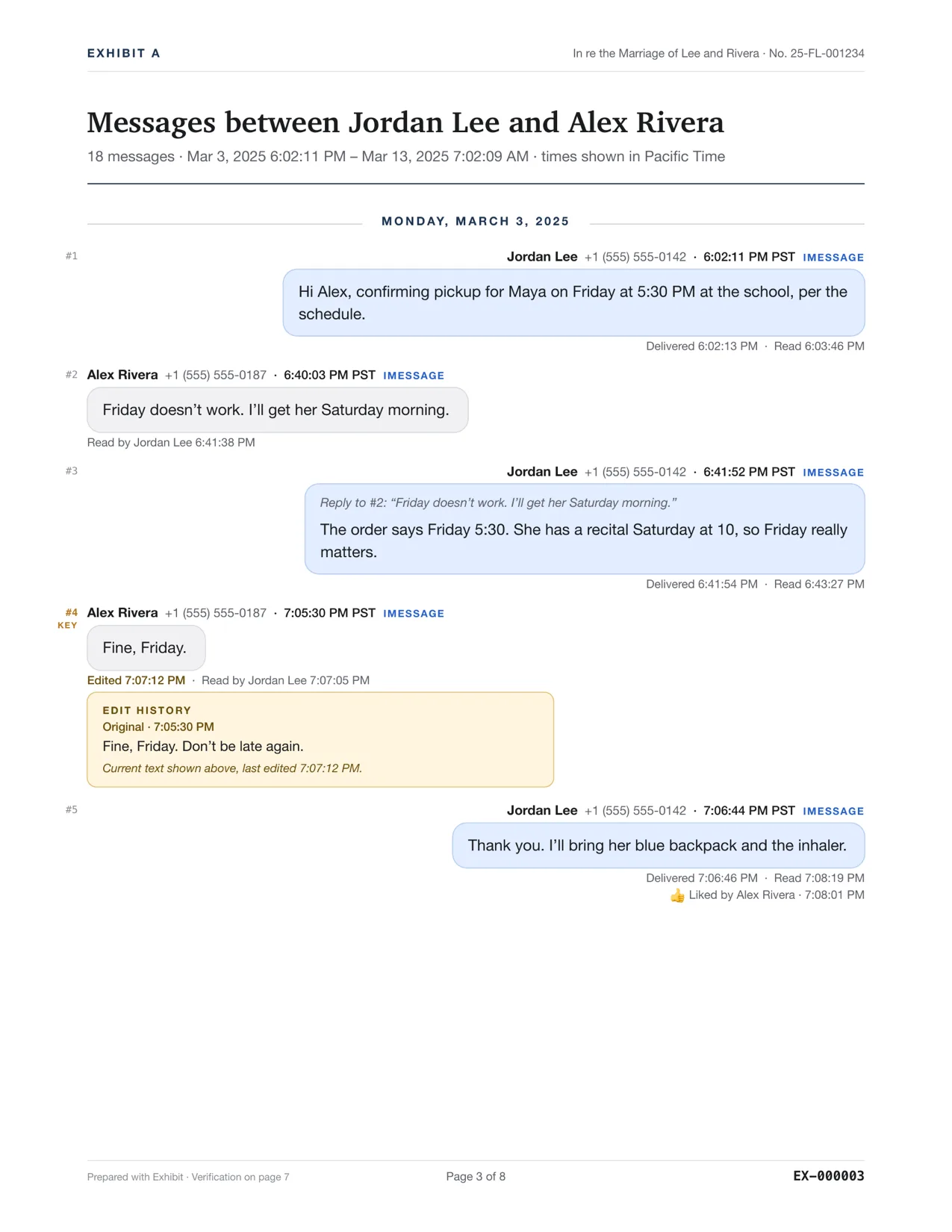
What does a Signal exhibit include?
Signal Desktop records the time of each message to the second and the sender's number, unless the person hides it with Signal's phone number privacy, in which case they appear by name. Exhibit prints delivered and read times for one-to-one messages you sent, edit history with earlier versions, messages unsent for everyone, reactions, replies and attachments. Signal keeps only the latest state of a message you sent, so a message that was read has no separate delivery time.
What does a Signal exhibit not include?
- Anything Signal Desktop never synced. That includes messages from before you linked, unless Signal transferred them.
- Disappearing messages that already disappeared, and messages deleted on the Mac.
- Attachments Signal Desktop never downloaded. They are listed by name only.
- Safety-number changes, group updates and similar notices. Only the messages themselves are included.
The PDF states these limits, so the reader does not assume more than the source holds.
A Signal exhibit shows what the Mac holds, not necessarily everything that was said. If a message you need is missing, say so plainly and do not guess. Signal changes its database from time to time. If Exhibit cannot read your version it says so and changes nothing. Courts differ, so ask the clerk or a lawyer what they expect.
How do I show the messages are real?
The same steps as for any text message apply: your testimony as someone who took part in the conversation, details that tie the messages to the other person, and the verification page with its SHA-256 hashes. See authenticating text messages. A Signal name or number is not a verified identity, so say how you know the account belongs to Alex Rivera.
Can I combine Signal with other apps?
Yes. Add the Signal conversation to an iMessage exhibit with right-click, Add to Current Exhibit. The merged exhibit shows only what every source records, see combining iMessage and WhatsApp. For a plain iMessage export, see exporting iMessages to PDF.
Questions
Does disappearing-message mode hide a conversation from export?
Messages that already disappeared are gone from Signal Desktop, so they cannot be exported. Messages still on the Mac are exported as they are.
Do I need to quit Signal Desktop first?
It is best to. Quitting stops Signal from writing while Exhibit reads. If a copy is caught mid-write, Exhibit tries once more and then asks you to quit Signal.