 Exhibit
How do I export a WhatsApp chat for court?
On a Mac you can read WhatsApp from WhatsApp for Mac or from an iPhone backup, which give exact times and phone numbers, or use the .zip from WhatsApp's Export Chat on any phone. Drop the source into Exhibit and click Create Exhibit for one numbered PDF. The Export Chat file is the weakest source: it has no time zone, often no seconds and usually names instead of numbers.
Updated November 17, 2026 · Not legal advice
Which WhatsApp source should I use?
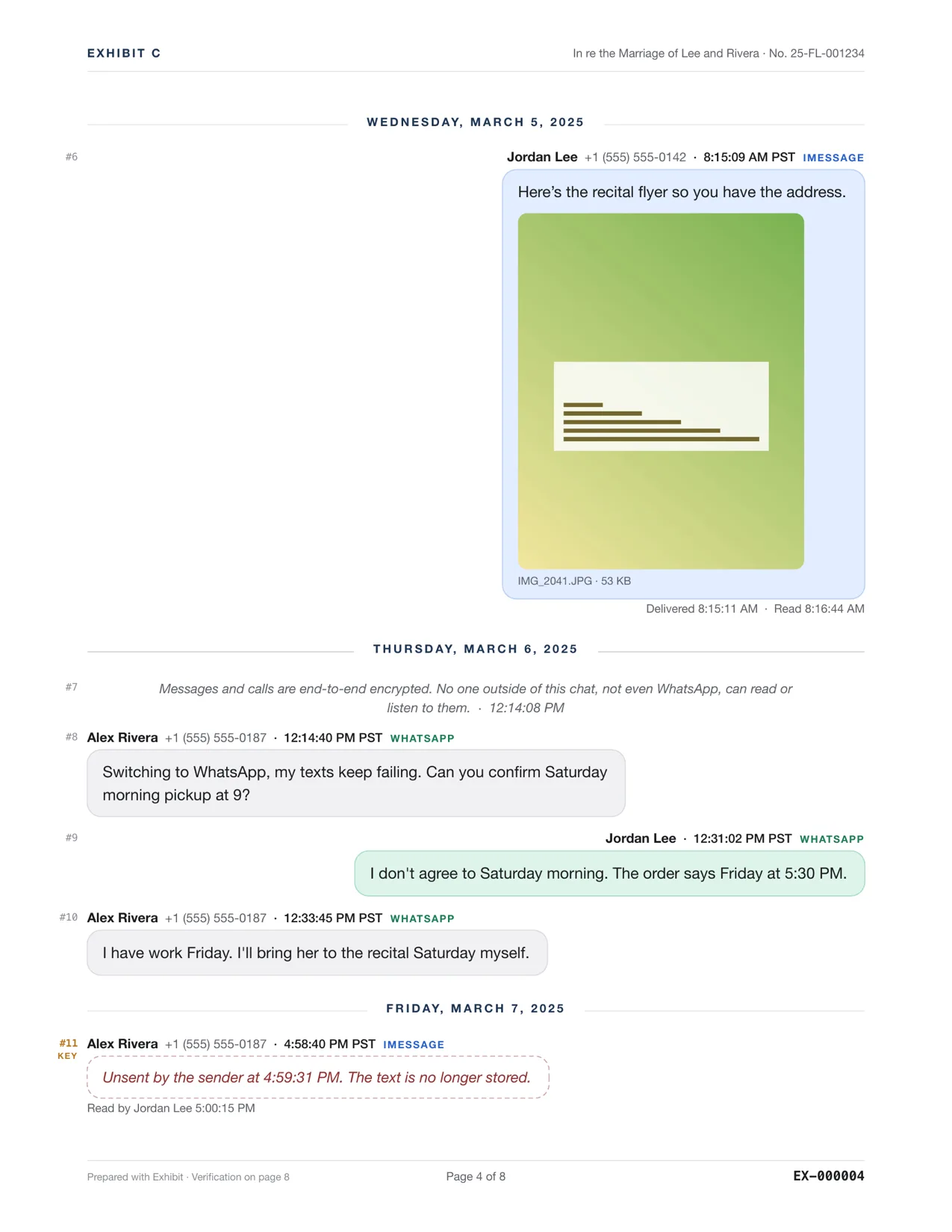
Exhibit reads WhatsApp three ways. They record different amounts of detail, so pick the best one you can get.
| Source | Time | Sender | Good for |
|---|---|---|---|
| WhatsApp for Mac | Exact, to the second | Phone number | You use WhatsApp on a Mac |
| WhatsApp inside an iPhone backup | Exact, to the second | Phone number | iPhone users, including old chats |
| Export Chat .zip | Seconds only on iPhone exports; minutes on Android | Name, usually not a number | Any phone, including Android |
WhatsApp's own database holds every chat, so the first two also let you pick any conversation. An Export Chat file holds one.
How do I export WhatsApp from an iPhone backup?
- Plug in the iPhone and open Exhibit. Let Exhibit make a fresh local backup, or open one you already have. Encrypted backups work if you have their password.
- When the backup contains WhatsApp, a WhatsApp source for that iPhone appears beside Messages.
- Pick the chat, set a Range and choose what to Show.
- Click Create Exhibit and read the PDF tab. The free preview is complete, with a PREVIEW watermark.
- Enter your license key in Settings → License and save the final PDF.
How do I use WhatsApp's Export Chat?
- In WhatsApp, open the chat, tap the contact's name, then Export Chat, and choose Attach Media so photos and voice notes come with it.
- Send the .zip to your Mac, for example by AirDrop or email.
- Drag the .zip onto the Exhibit window or the Dock icon. The file does not say which person exported it, so Exhibit needs to know which one is you.
- Create the exhibit as usual.
What are the limits of Export Chat?
- WhatsApp may cap an export at about 10,000 messages with media or 40,000 without. Nothing in the file shows how much is missing.
- The file has no time zone. Exhibit assumes the one set on your Mac and says so.
- Android exports show minutes, not seconds. iPhone exports show seconds.
- Edited messages are flagged but the original text is not kept, and deleted messages show only the placeholder.
- There are no delivered or read times in the file.
What does Exhibit not show from WhatsApp?
From WhatsApp's own database, Exhibit does not read delivery and read receipts or which message a reply quotes, because WhatsApp stores them in a format Exhibit does not decode. The PDF says so. WhatsApp keeps no edit history. Media that WhatsApp never downloaded is listed by name only.
How do I check the WhatsApp PDF before I file it?
Compare it with the chat on the phone. Check the first and last messages and the media. For an Export Chat file, look at the source notes in the PDF, which say which time zone was assumed. If WhatsApp capped the export, the earliest messages may be missing, and nothing in the file says how many. In that case, try the iPhone backup or WhatsApp for Mac, which hold the full history the app has.
A name in a WhatsApp export comes from the exporter's contacts. It is not a verified identity. Be ready to explain how you know the number belongs to Alex Rivera, see authenticating text messages. Courts differ, so ask the clerk or a lawyer.
Can I put WhatsApp and iMessage in one PDF?
Yes, when the same person writes to you in both. The exhibit then shows only what every source has. See combining iMessage and WhatsApp. WhatsApp voice notes are covered in transcribing voice messages.
Questions
Does WhatsApp end-to-end encryption stop me exporting my own chats?
No. Encryption protects messages in transit. Once a message is on your phone or Mac, you can export your own copy, which is what Exhibit reads.
Can I export a group chat?
Yes. Group chats from WhatsApp's database or an export file work the same way. People who left the group may appear only as phone numbers.